
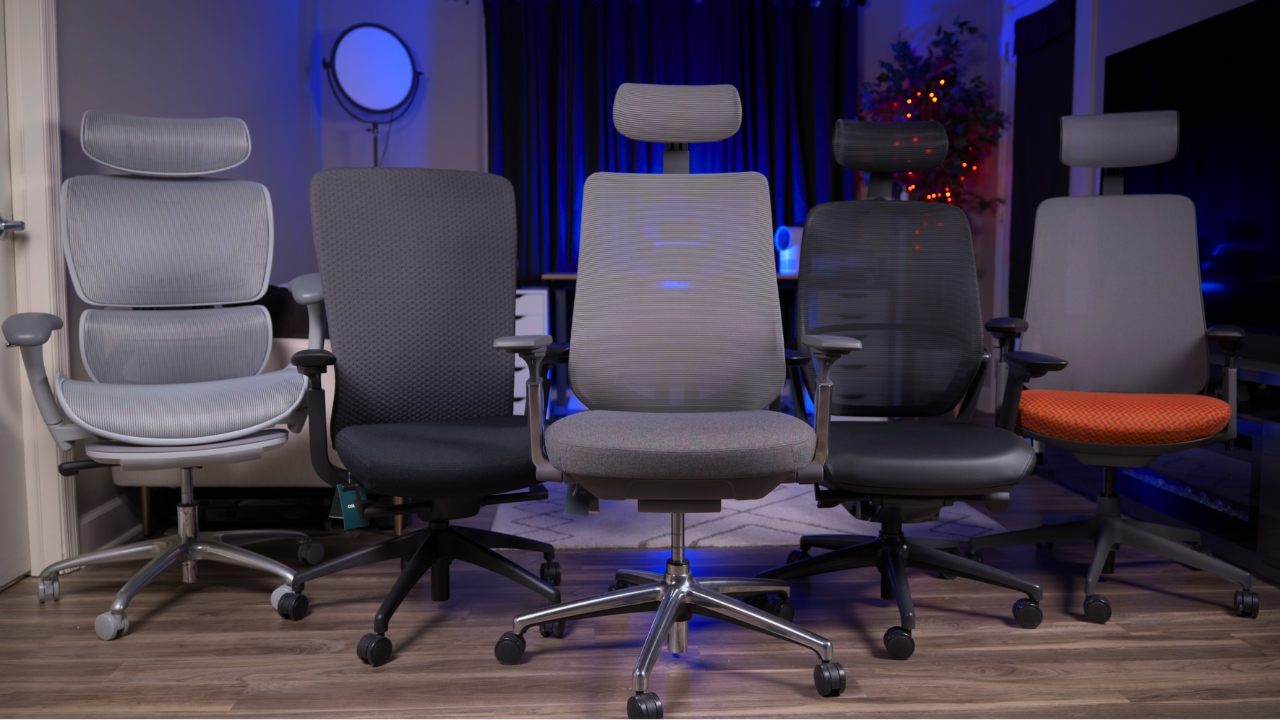
When combined with the best standing desk, an ergonomic office chair is the most important tool in any home or professional office. However, thanks to the exponential growth in both remote work and the office furniture market, there are now hundreds of companies producing thousands of different chairs. This is both good and bad. It’s good because you have a plethora of options to choose from; it’s bad because it’s suddenly that much harder to decide what the best office chair is.
That’s where we come in. In this guide, we want to help you find the best COLAMY office chair for 2025. We have personally tested every single chair in COLAMY’s current lineup over the past several months, spending hundreds of hours sitting in these chairs, comparing them side by side, and really putting them through their paces.
Our team of expert testers includes remote workers, content creators, gamers, and ergonomic furniture enthusiasts who understand what makes a great office chair.
We use a multi-point furniture testing methodology as we sit in the chairs for extended work sessions, recline in them, adjust every feature, and evaluate how they perform throughout the day. Additionally, we look at things like their value for the price, warranty, and customer service.
A few attributes we examine when testing office chairs are:
- Price
- Build Quality
- Seat Comfort
- Backrest Support
- Adjustability Features
- Armrest Quality
- Materials & Breathability
Office chairs are at the top of my list of essential home office equipment, and for a good reason: They are the foundation of productivity and comfort. So, with these attributes defined, let’s dig into my picks for the top COLAMY chairs.
The Best COLAMY Office Chairs Review Video:
- Best Overall – COLAMY Atlas
- Best Mesh – COLAMY 5188
- Best Flexibility – COLAMY Neza
- Best for Ease of Use – COLAMY Velia
- Best Build Quality – COLAMY Hina
COLAMY Atlas — Best Overall COLAMY Chair

Our Pick: Best jack-of-all-trades chair with excellent balance across all categories
Value Rating: 5 out of 5 — Outstanding quality and features at the $280 price point
Who It’s For:
- Multi-purpose users — This is the most well-rounded chair in the lineup
- Home office workers — Perfect for those who want a complete package without compromises
- First-time ergonomic chair buyers — The safest pick for most people
Pros of the COLAMY Atlas:
- Exceptional build quality feels like a $500 chair
- Perfect balance of comfort and support with medium-firm seat
- Smooth seat pan depth adjustment with no gaps
- Excellent synchro-tilt recline mechanism
- Three-way adjustable headrest with good hold
- Heavy-duty metal and nylon base
Cons of the COLAMY Atlas:
- Lumbar support can feel slightly poky
- Armrest depth adjustments are too loose
- Arm pads are somewhat stiff
Tensile Strength (Build Quality): Exceptional
Cost: $280
Seat Type: Medium-firm foam cushion
The COLAMY Atlas is what we consider the jack-of-all-trades in COLAMY’s lineup. Coming in at around $280 on Amazon, the Atlas is without a doubt the best office chair under $300 that we’ve ever tested. In fact, this chair honestly feels more like a $500 chair in terms of construction.
What makes the Atlas special is that it offers everything from build quality to features, adjustability, and comfort without any major compromises. While most other COLAMY chairs excel in certain areas while making small tradeoffs in others, the Atlas is simply solid across the board.
What Our Tester Says:
“The Atlas is essentially the most balanced option out of all of them, so it’s probably the safest pick for most people if you just want a good chair and don’t have any specific preferences in mind.”
Build Quality & Materials
The build quality genuinely surprised us at this price point. The Atlas uses a heavy-duty single-piece metal and nylon base that’s uncommon in this category. The metal armrest components have virtually no wobble, and the high-quality seat cushion feels substantial. Every component feels premium and built to last.
Seat Comfort
The seat features a medium-firm cushion that strikes a perfect balance between support and comfort. What really impressed us is the seat pan depth adjustment system—it uses a smooth, responsive dial similar to what you’d find on the $1,500 Steelcase Gesture. Even when fully extended, there’s no gap between the seat and backrest, something even premium chairs struggle with.
Backrest Design
The backrest features a natural S-curve design reminiscent of the Eurotech Vera, which is one of our favorite $500 chairs. The mesh has good elasticity, providing excellent support without being too firm. The frame design prevents your shoulders from hitting hard edges while allowing good flexibility during movement.
While the height-adjustable lumbar support is decent, we actually think the chair would be better without it. The natural curve already provides good support, and the plastic lumbar piece can feel a bit pokey against your back.
Recline & Adjustability
The recline is impressively smooth with a synchro-tilt mechanism and deep recline angle. The tilt tension knob is conveniently placed and responsive—a rare feature in budget chairs that typically hide this adjustment underneath the seat.
The armrests are 4D adjustable with good height, width, depth, and pivot adjustments. While the arm pads are a bit stiff for our taste, the overall stability more than makes up for it. One issue we found is that the depth adjustments are too loose, which means they can slip when you push off the armrests.
Headrest
The headrest is three-way adjustable with height, angle, and depth adjustments. It uses the same mesh as the backrest for a consistent look and holds its position well, unlike many budget headrests that sag over time. You have a ton of adjustability and it’s comfortable to use in pretty much any position.
Overall Assessment
The Atlas is simply a complete package. It has everything: good build quality, features, adjustability, and comfort. While it’s not the absolute best in every single category, it’s either really good or above average across the board. Some of the other chairs may be better than the Atlas in certain areas, but they have noticeable drawbacks in others.
Since the Atlas is the most well-rounded chair on the list, we think it’s probably the easiest one to recommend to most people. If you’re looking for a solid, reliable office chair that does everything well without breaking the bank, the Atlas is your chair.
For those who want a more premium aesthetic with genuine leather, check out the COLAMY Hina, which takes a more refined approach to the Atlas formula.
Read the full COLAMY Atlas Review Here
COLAMY 5188 — Best All-Mesh Chair

Our Pick: Best breathable chair for hot environments
Value Rating: 4.5 out of 5 — Excellent execution of all-mesh design at budget price
Who It’s For:
- Hot sleepers/workers — Superior breathability keeps you cool
- Tall users (5’6″+) — Wide and deep seat accommodates larger frames
- Herman Miller Aeron fans — Budget alternative with similar design language
Pros of the COLAMY 5188:
- Exceptional breathability with full mesh construction
- High-quality mesh with nice suspended feeling
- Excellent backrest with split design for flexibility
- Super soft, squishy armrest pads
- Wide and spacious seat
- Premium Herman Miller Aeron-inspired design
Cons of the COLAMY 5188:
- Not suitable for cross-legged sitting due to side bolsters
- Mesh seats can be polarizing
- No width adjustment on armrests (though large pads compensate)
Build Quality: Excellent
Cost: $260
Seat Type: All-mesh construction
The COLAMY 5188 is the only chair in COLAMY’s lineup with all-mesh construction, meaning it has both a mesh backrest and a mesh seat. It’s heavily inspired by the Herman Miller Aeron, so if you’re looking for an Aeron-style chair but are on a tighter budget, the 5188 is an excellent option.
What Our Tester Says:
“Most budget all-mesh chairs I’ve tested in the past have been pretty bad. It’s just really hard to make a comfortable mesh seat at this price point. The 5188 does a pretty good job.”
The Main Advantage: Breathability
The main advantage of all-mesh office chairs is definitely breathability. The mesh allows air to easily pass through, so it doesn’t trap any of your body heat. If you’re someone who tends to run hot when sitting, this could be a really good pick.
Seat Comfort
Mesh seats can be pretty polarizing—some people love them and some people hate them. This will probably be the biggest determining factor when considering the 5188 over any of the other models, since it’s the only one with a mesh seat.
Mesh seats are notoriously difficult to execute well, especially in budget chairs, but the 5188 does an excellent job. The mesh quality is very good, providing a nice suspended feeling without being too firm. The seat is pretty wide and deep, giving a spacious feel and preventing contact with the hard frame. We think the 5188 is going to be better for taller people, 5’6″ and up.
Like many mesh chairs, the 5188 has pronounced side bolsters similar to the Aeron, meaning it’s not going to be comfortable for people who like to sit cross-legged. That said, it does give you that nice hammock-like floating feeling that mesh seats are known for.
Backrest Excellence
The backrest is arguably the strongest feature on the 5188. Its high, wide design prevents you from feeling the frame edges when sitting normally. It uses a ratcheting height adjustment system with a generous range, allowing proper positioning for different body types. The split design, where the top backrest and lumbar support move independently, provides flexibility as you stretch and shift positions.
The mesh lumbar support has a soft, supportive feel without being pokey. There’s no intensity adjustment, but the natural shape provides good support, and the mesh quality ensures comfort with its balance of sink and support.
Armrests
The armrests are really good for a budget chair, resembling the Herman Miller Mirra 2 with an oval shape and drooping front. The pads are super soft and squishy—better than those found on many $500 chairs. You get 3-way adjustability (height, depth, pivot) with good range. They lack width adjustments, but we didn’t have too many issues because of how large the arm pads are.
Overall Assessment
The 5188 is a really solid option if you know you want an all-mesh office chair. The build quality is great, it’s breathable, it’s comfortable, and has good adjustability. If you were looking at something like an Aeron but can’t afford to spend that much on a chair, then the 5188 is a decent budget alternative.
For a more traditional cushioned seat with mesh backrest, consider the COLAMY Atlas or Hina instead.
Read the full COLAMY 5188 Review Here
COLAMY Neza — Best for Flexibility & Movement

Our Pick: Best chair for dynamic movement with premium feel
Value Rating: 5 out of 5 — High-end features at budget price
Who It’s For:
- Active sitters — Flexible backrest promotes natural movement
- Comfort seekers — Softer seat with excellent cushioning
- Design enthusiasts — Haworth Fern-inspired aesthetic
Pros of the COLAMY Neza:
- Unique flexible plastic frame wrapped in premium upholstery
- Exceptionally soft, supportive seat cushion
- Armrests recline with you
- Premium textured upholstery inspired by Haworth Fern
- Smooth synchro-tilt with crank-style tension adjustment
- Deep 127-degree recline
Cons of the COLAMY Neza:
- No headrest option
- Less breathable than mesh alternatives
- Slightly lower build quality than Atlas (all-plastic construction)
- Stiffer armrest pads
Build Quality: Good (step down from Atlas)
Cost: $250-$280
Seat Type: Thick, soft foam cushion with upholstery
The COLAMY Neza brings some interesting design elements to this price range. It’s the only chair in the lineup that is fully upholstered, which is pretty unique for budget office chairs that typically use mesh at least for the backrest. The textured upholstery on the backrest is reminiscent of the Digital Knit material found on the Haworth Fern, a chair costing nearly five times as much.
What Our Tester Says:
“The real standout feature of the Neza is the backrest. The flexible plastic frame wrapped in soft knitted upholstery is inspired by the Haworth Fern. Most budget ergonomic chairs use mesh backrests with rigid frames, making this design unique in the price range.”
Materials & Build Quality
The Neza is built well, but we think it’s a bit of a step down from the Atlas. It uses a single-piece nylon base rather than a metal and nylon combination, and the frame is primarily plastic. However, the plastic is dense and high-quality, allowing for both durability and flexibility. The upholstery feels premium—soft to the touch with good cushioning that adds to the chair’s high-end feel.
Seat Comfort
The seat uses a thicker, softer cushion compared to the Atlas. It lets you sink in more while still maintaining good support without bottoming out. Most ergonomic chairs lean towards firmer seats since they’re generally more supportive, but some people prefer the comfort of softer seats since they provide better pressure relief for your sit bones.
The Standout: Flexible Backrest
The backrest uses a flexible plastic frame wrapped in soft knitted upholstery. The frame has excellent flexibility, promoting natural movement throughout the day—a feature typically found only in higher-end chairs. Every other chair in COLAMY’s lineup uses mesh in the backrest, which requires a rigid frame that limits flexibility.
The fully upholstered design isn’t as breathable as mesh but provides a softer, cozier feel that’s especially nice for lounging. One notable drawback is that the Neza is the only chair in COLAMY’s lineup that does not have a headrest, which could be a deal-breaker for some people.
Recline Mechanism
The Neza uses a synchro-tilt recline mechanism that feels smooth with a deep 127-degree recline. You can lock the chair in various reclined positions, which is good for lounging. The recline uses a crank-like tilt tension mechanism similar to Haworth chairs—responsive and easily adjustable while seated.
Armrests
The armrests are pretty good with 4D adjustability. One thing we really like is that they’re connected to the backrest, meaning they recline with you—a feature typically found only in higher-end chairs from Haworth and Herman Miller. The arm pads on the Neza are pretty stiff though. We wish they were a bit softer like the Velia or the 5188, but they’re not too bad.
Overall Assessment
At $250-$280, the Neza offers excellent value with several high-end features typically found only in chairs costing over $1,000. The main standout features are the fully upholstered flexible frame and seat comfort.
It’s clear that COLAMY was trying to bring high-end features that you would get from something like the Fern or the Steelcase Leap to a budget chair. If you’re someone who values flexibility and movement throughout the day and prefers a softer, more cushioned seat, then the Neza is probably going to be a good fit for you.
For those who need a headrest, consider the Atlas or Hina instead.
Read the full COLAMY Neza Review Here
COLAMY Velia — Best for Ease of Use
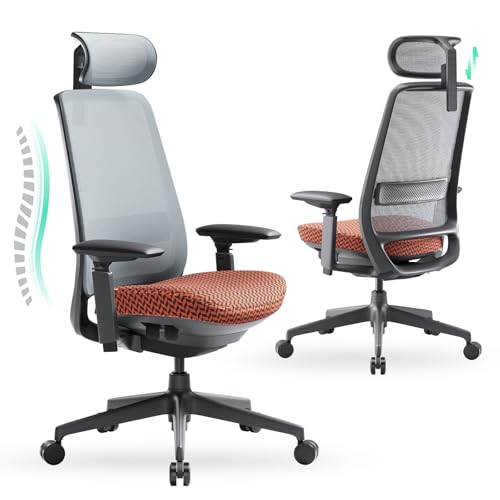
Our Pick: Best chair for simplicity with exceptional comfort
Value Rating: 4 out of 5 — Excellent comfort features with some build quality tradeoffs
Who It’s For:
- Ergonomic chair beginners — Weight-activated recline requires no adjustment
- Comfort-first users — Most comfortable seat and armrests in lineup
- Cross-legged sitters — Flat seat design accommodates various positions
Pros of the COLAMY Velia:
- Most comfortable seat in the lineup
- Best armrests with super soft, squishy pads
- Innovative weight-activated recline (Donati mechanism)
- Flat seat design great for cross-legged sitting
- Armrests recline with you
- Modern coral and grey color options
Cons of the COLAMY Velia:
- Lower build quality (all-plastic construction)
- Flimsy, flexibility-prone headrest
- Limited headrest adjustment (height only)
- Gap between seat and backrest when extended
- Coarse mesh texture
- Lower-quality mesh compared to other models
Build Quality: Good (but step down from Atlas)
Cost: $250-$280
Seat Type: Firm foam with good give
The COLAMY Velia is one of their newest models. It takes a much simpler approach when it comes to features and adjustability, making it ideal for people who aren’t too accustomed to dialing in their chair. If you’re not familiar with ergonomic chairs, then all the different adjustments can be pretty overwhelming, and the Velia makes it pretty easy.
It also has arguably the most comfortable seat and armrests out of all the chairs on the list, though there are some tradeoffs.
What Our Tester Says:
“The Velia is the only chair on this list that uses a weight-activated recline mechanism and it works surprisingly well. It automatically adjusts the tilt tension based on your weight, so you don’t need to dial it in yourself.”
Design & Aesthetics
The Velia features a sleek, modern design with a bright coral seat upholstery that really makes it stand out. If you prefer something more neutral, it’s also available in black with grey upholstery. The design is versatile enough to fit in any setup, whether it’s a professional office environment, home office, or gaming setup.
Seat Comfort Excellence
We think this is one of the most comfortable seats out of all of COLAMY’s chairs. We really like the seat shape on the Velia—it’s much flatter compared to the Atlas, making the sittable area feel wider. The Atlas tapers off at the edges, which can make the seat feel smaller.
The Velia uses a relatively firm seat pad with good give to it—about as firm as the Atlas but very comfortable and supportive. We can comfortably sit in this chair for 8+ hours with no issues.
The seat has no hard frame edges, making it great for sitting cross-legged or with one leg tucked under. The flat shape helps distribute weight evenly throughout the seat. It features a seat pan depth adjustment, though when fully extended, you can feel a gap between the back of the seat and the backrest, especially when reclining. This could be an issue for taller people.
Backrest
The backrest has a nice natural lumbar curve that matches your spine’s shape and feels very supportive. The frame tapers toward the top, allowing you to spread your arms without restriction. It uses a fabric-like mesh material with good elasticity, though we found it a bit coarse to the touch. The frame is made of dense plastic but doesn’t have much flexibility.
The adjustable lumbar support is quite poor—it’s a flimsy piece of plastic with no padding and only height-adjustable. It feels almost non-existent when sitting. However, the natural shape of the backrest already provides good lumbar support, making the adjustable feature unnecessary.
Weight-Activated Recline
What makes the Velia easy to use is the weight-activated mechanism. The Velia is the only chair on this list that uses a weight-activated recline mechanism, and it works surprisingly well. It automatically adjusts the tilt tension based on your weight, so you don’t need to dial it in yourself with a separate knob. While you may not have as much control over your tilt tension, it definitely makes it easier to use.
It’s a Donati mechanism, so it’s high quality and works really well. We can comfortably maintain a partially reclined position, giving that nice suspended feeling. It has a smooth, deep recline, and you can lock the chair in a reclined position for lounging.
Best-in-Class Armrests
The armrests on the Velia are excellent, featuring 4D adjustability with good ranges. Unlike the Atlas, these adjustments have proper resistance, preventing accidental movement. The armrests are connected to the backrest, so they recline with you, which makes them much more usable when lounging.
The arm pads are the best out of any COLAMY chair. They’re super soft and squishy, a huge improvement over the Atlas’s hard, stiff pads.
Headrest Concerns
The headrest is only height-adjustable, which is limited compared to the Atlas’s 3D adjustment. It has a curved shape that fits well into your neck, and it flexes with your movements. However, this flexibility makes it feel somewhat flimsy, raising durability concerns.
Build Quality Tradeoffs
The biggest drawback to the Velia is the materials and build quality. We think it’s definitely a step down from the Atlas. It’s basically all-plastic construction with no metal components. The headrest feels pretty cheap and flimsy. Also, the mesh just isn’t as high quality as what you’ll find on the other COLAMY chairs.
With that said, the build quality isn’t bad by any means. It’s still pretty good compared to most other office chairs in this price range, just a noticeable step down from the other COLAMY chairs. For many people, we think the comfortable seat, armrests, and overall ease of use are a worthwhile tradeoff.
If build quality is your top priority, stick with the Atlas or Hina.
Read the full COLAMY Velia Review Here
COLAMY Hina — Best Build Quliaty
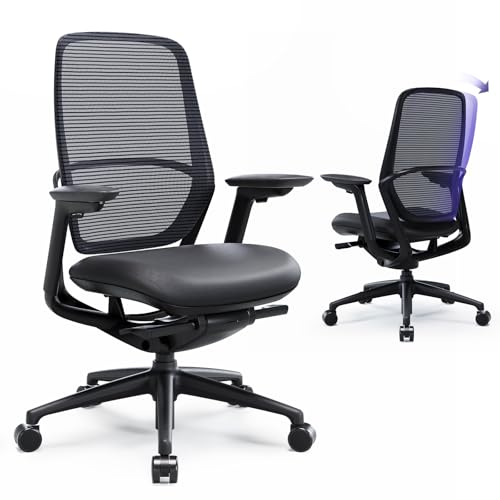
Our Pick: Best refined design with genuine leather upholstery
Value Rating: 4.5 out of 5 — Exceptional materials and construction
Who It’s For:
- Premium aesthetic seekers — Sleek, modern design with genuine cowhide leather
- Firm seat lovers — Densest, firmest seat in the lineup
- Professional environments — Sophisticated appearance perfect for home offices
Pros of the COLAMY Hina:
- Best build quality in the lineup with sleek metal frame
- Genuine cowhide leather upholstery (rare at this price)
- Most comfortable backrest without aggressive lumbar support
- Smooth synchro-tilt with deep 137-degree recline
- Excellent three-way adjustable headrest
- Sophisticated, streamlined aesthetic
- Armrests recline with you
Cons of the COLAMY Hina:
- Tilt limiter instead of tilt lock (can’t lock in reclined position)
- Firmest seat may be too firm for some
- Stiff armrest pads
- Rounded arm pads can allow arms to slip off
Build Quality: Best in lineup
Cost: $280-$300
Seat Type: Firm high-density foam with genuine cowhide leather
The COLAMY Hina has a sophisticated, high-end appearance that sets it apart from typical budget chairs around $300. Its clean modern aesthetic with sleek lines and black coloring creates a uniform design that would fit perfectly in any professional environment, home office, or gaming setup. The curved armrests integrate smoothly into the frame, creating a streamlined, futuristic look.
What Our Tester Says:
“The Hina is very similar to the Atlas in a lot of ways, but just feels a bit more refined. It’s one of my favorite options out of all of them.”
Exceptional Build Quality
Build quality is exceptional at this price point—maybe even better than the Atlas. The sleek metal frame and arms give it a premium feel, and the heavy-duty single-piece metal and nylon base provides excellent stability. The high-density foam seat is wrapped in genuine cowhide leather, which is practically unheard of at this price point. The stitching looks great, and the mesh used is the same high-quality material found on the Atlas with good elasticity.
Seat Comfort
The seat uses a dense foam pad that’s firmer than any other chair in COLAMY’s lineup. While we personally prefer firm seats, some might find it too firm. There’s decent give to it, and we find it comfortable and supportive for long sessions. The seat shape tapers at the edges but is flat in the middle area, and without hard frame edges, it’s great for cross-legged sitting. It includes a seat pan depth adjustment that’s easy to access and adjust.
Superior Backrest
The backrest is arguably the most comfortable of any COLAMY chair—even better than the Atlas. It’s really similar to the Atlas, using the same mesh material. It has good elasticity and conforms well to your back, offering a balance between support and flexibility.
Unlike the Atlas, the Hina doesn’t have adjustable lumbar support, which we personally see as a benefit since the Atlas’s lumbar support is a bit too aggressive and pokey. The natural curve of the Hina’s backrest provides all the support you need without any additional hardware.
Recline Mechanism
The Hina has a synchro-tilt mechanism with very smooth action and a deep 137-degree recline angle. However, unlike all the other COLAMY chairs, the Hina is the only one that features a tilt limiter, not a tilt lock.
These locking positions just prevent you from being able to recline all the way back, but you can always come back up from a reclined position. This could definitely be a deal-breaker for some people who like to lock their chair in a reclined position when lounging, so keep that in mind.
Armrests & Headrest
The 4D adjustable armrests are connected to the backrest, meaning they recline with you, similar to the Neza and the Velia. This is a huge improvement over the Atlas, where reclining creates a gap between the backrest and arms.
The arm pads are really similar to the Neza. They could definitely be softer, and their rounded edges make it easy for arms to slip off sometimes. But aside from that, they get the job done.
The headrest is identical to the Atlas, so it’s really good. It’s three-way adjustable with height, depth, and pivot adjustments. It uses the same mesh as the backrest and holds position well.
Overall Assessment
We really like the Hina—it’s one of our favorite options out of all of them. We love the sleek and modern design, and the materials and build quality are the best out of all these COLAMY chairs. It also has the most comfortable backrest in our opinion.
Like we said, it’s very similar to the Atlas in a lot of ways, but just feels a bit more refined. The main tradeoffs you’ll need to consider are the lack of tilt lock and the seat that some people will find too firm. Besides this, we still think the Atlas is a safer pick for most people, but if these tradeoffs aren’t an issue for you, then go with the Hina.
If you want maximum versatility with full tilt lock functionality, stick with the Atlas instead.
Read the full COLAMY Hina Review Here
How We Picked and Tested the COLAMY Chairs
To compile our list for the best COLAMY office chairs for 2025, we spent several months extensively testing every single chair in COLAMY’s current lineup. We sat in these chairs for hundreds of hours, comparing them side by side, and really putting them through their paces in real-world work scenarios.
Our testing took place in various environments, including home offices, professional workspaces, and gaming setups. We evaluated each chair during extended work sessions lasting 8+ hours, testing them for content creation, video editing, gaming, and general office tasks.
There is a wide variety of office chairs available today, with each category hitting every price point from under $100 all the way up to $2,000 and beyond. For this roundup, we focused specifically on COLAMY’s lineup because they’ve consistently delivered exceptional value in the under-$300 category.
Most of the chairs we tested are priced between $250-$300, making them accessible for home office workers, students, and anyone looking for a quality ergonomic chair without breaking the bank. Ultimately, after extensive deliberation and testing, we evaluated the following features, ordered by importance:
Seat Comfort: The seat should provide adequate support for 8+ hour work sessions without causing pressure points or discomfort. We tested each chair with various body types and sitting positions to ensure broad compatibility.
Build Quality: Although these chairs are budget-friendly, they need to be constructed well to provide reliable performance over their lifetime. A good office chair should last many years with proper care.
Backrest Support: The backrest should promote proper posture while allowing natural movement throughout the day. We evaluated both mesh and upholstered backrests for support, breathability, and comfort.
Adjustability: The chair should offer enough adjustment options to accommodate different body types and preferences. Key adjustments include seat height, armrests, lumbar support, and recline tension.
Armrest Quality: Armrests should be comfortable, stable, and properly adjustable. We tested how well they supported various working positions and whether they interfered with desk clearance.
Materials & Breathability: The materials used should be durable and appropriate for the intended use environment. Mesh materials provide better breathability, while upholstered chairs offer a cozier feel.
Price: The price should reflect the features and quality offered. Value is more important than a low sticker price. We found that COLAMY consistently delivers features typically found on chairs costing $500+ while maintaining prices under $300.
Warranty: A good warranty demonstrates manufacturer confidence in the product. Most COLAMY chairs come with warranties ranging from 1-3 years, which is standard for this price range.
During testing, we evaluated each chair’s performance across multiple criteria. We sat in them for extended periods, tested every adjustment mechanism, compared the quality of materials, evaluated armrest stability, tested recline smoothness, and assessed overall durability. We also compared build quality across the entire lineup to identify which models offered the best construction for the price.
Benefits of Quality Office Chairs
First of all, sitting in a quality ergonomic chair just feels amazing. There’s nothing like settling into a chair that properly supports your body and allows you to work comfortably for hours on end.
Health benefits aside, however, there are actual, tangible benefits to investing in a proper office chair:
Improved Posture
According to research, prolonged sitting in poorly designed chairs can lead to chronic back pain and posture problems. However, ergonomic chairs with proper lumbar support and adjustability can significantly improve spinal alignment and reduce strain on your back muscles.
A quality office chair encourages proper posture by supporting the natural curve of your spine. When you maintain good posture, you’re less likely to experience neck pain, shoulder tension, and lower back discomfort that plague office workers.
Increased Productivity
When you’re comfortable, you can focus better on your work. Discomfort and pain are major distractions that can significantly reduce productivity. A good chair eliminates these distractions, allowing you to concentrate on the task at hand.
Studies have shown that workers with ergonomic seating report higher job satisfaction and productivity levels compared to those with standard seating.
Reduced Pain and Discomfort
Quality office chairs are designed to distribute your body weight evenly, reducing pressure points and preventing the development of pain in your lower back, hips, and tailbone. Features like adjustable lumbar support, seat depth adjustment, and proper cushioning work together to keep you comfortable throughout the day.
Unlike cheap chairs that can cause discomfort after just an hour or two, a well-designed ergonomic chair should keep you comfortable for 8+ hour work sessions.
Long-Term Health
Investing in a quality office chair is investing in your long-term health. Poor seating can contribute to serious health issues over time, including chronic back problems, poor circulation, and even cardiovascular issues related to prolonged poor posture.
A good ergonomic chair promotes movement, supports proper alignment, and encourages healthy sitting habits that can benefit your health for years to come.
Versatile Work Environment
Office chairs aren’t just for traditional desk work. You can use your ergonomic chair for:
- Remote work and video conferences
- Gaming sessions
- Creative work like design and video editing
- Reading and studying
- Casual browsing and entertainment
The versatility of a quality chair means you’ll get value from it whether you’re working, playing, or relaxing.
Cost-Effective Investment
While budget office chairs might seem like the economical choice, they often need replacing within a year or two. A quality chair like those from COLAMY can last 5+ years with proper care, making them more cost-effective in the long run.
When you calculate the cost per day of use, spending $250-$300 on a chair you’ll use for several hours daily over multiple years becomes one of the best investments you can make for your workspace.
Quick COLAMY Chair Comparison Guide
Once you’ve decided you want a COLAMY chair, which one should you choose? Here’s our quick comparison guide:
Choose the Atlas if: You want the most well-rounded option with no major compromises, excellent build quality, and comprehensive adjustability.
Choose the 5188 if: You prioritize breathability and prefer all-mesh construction, or if you’re a fan of the Herman Miller Aeron aesthetic but need a budget alternative.
Choose the Neza if: You value flexibility and movement, prefer a softer cushioned seat, and want fully upholstered comfort without a headrest.
Choose the Velia if: You want the most comfortable seat and armrests, prefer simplicity with weight-activated recline, and like to sit cross-legged.
Choose the Hina if: You want the most premium aesthetic with genuine leather upholstery, prefer firm support, and can live without a tilt lock feature.
Understanding Office Chair Features
There are several key characteristics of a quality office chair that distinguish premium models from budget alternatives. These include:
Seat Construction
The seat is arguably the most important component since it bears your weight for hours at a time. Quality seats use high-density foam that maintains its shape over time rather than flattening out. The seat should have adequate depth to support your thighs without putting pressure on the back of your knees.
Seat pan depth adjustment is crucial for accommodating different leg lengths. When properly adjusted, you should have 2-4 inches of space between the back of your knees and the seat edge.
Backrest Design
The backrest should support the natural S-curve of your spine, particularly in the lumbar region. Mesh backrests offer superior breathability and can conform to your back’s contours, while upholstered backrests provide a softer, cozier feel.
Adjustable backrests allow you to customize the support level and position. Some chairs feature flexible frames that move with you, promoting dynamic sitting rather than static positioning.
Lumbar Support
Lumbar support helps maintain the natural inward curve of your lower back. This can come in several forms:
- Built-in lumbar curve in the backrest design
- Adjustable lumbar pads that can be repositioned
- Inflatable lumbar support (rare in budget chairs)
The best lumbar support feels natural and supportive without being overly aggressive or poky.
Recline Mechanisms
There are several types of recline mechanisms:
Synchro-Tilt: The backrest and seat recline together at different angles (typically 2:1 ratio). This is considered the gold standard for ergonomic chairs as it maintains proper support throughout the recline.
Tilt Lock vs. Tilt Limiter: A tilt lock allows you to lock the chair in various reclined positions, while a tilt limiter only prevents you from reclining past certain points but doesn’t lock you in place.
Weight-Activated: Automatically adjusts tension based on your body weight, eliminating the need for manual adjustment.
Armrest Adjustability
Armrests should support your arms without forcing your shoulders up or restricting movement. Quality adjustability includes:
- 1D: Height adjustment only
- 2D: Height and depth
- 3D: Height, depth, and pivot
- 4D: Height, depth, pivot, and width
The armrests should be stable without wobbling and ideally recline with the backrest for consistent support.
Materials and Durability
Quality office chairs use a combination of materials:
Metal components provide superior strength and durability compared to plastic, particularly in the base and armrest frames.
High-quality mesh should have good elasticity and support without sagging over time. It should be breathable while still providing adequate support.
Premium upholstery materials like genuine leather or high-grade fabric resist wear and maintain their appearance over years of use.
Dense foam cushioning maintains its shape and support rather than compressing and flattening.
Caring for Your COLAMY Chair
To ensure your chair lasts for years, follow these maintenance tips:
Regular Cleaning
For mesh chairs, vacuum the mesh surfaces weekly to remove dust and debris. For upholstered chairs, spot clean spills immediately with a damp cloth. For leather chairs like the Hina, use a leather conditioner every few months to prevent cracking.
Lubrication
If you notice squeaking in the recline mechanism or gas lift, apply a silicone-based lubricant to the moving parts. Avoid oil-based lubricants that can attract dust and dirt.
Inspection
Periodically check all adjustment mechanisms and fasteners. Tighten any loose screws or bolts to prevent premature wear. Inspect the casters for debris that might affect rolling performance.
Weight Limits
Respect the manufacturer’s weight capacity to prevent damage to the gas lift and base. Most COLAMY chairs are rated for 250-300 pounds.
Proper Use
Avoid standing on the chair or using it for purposes other than sitting. Don’t force adjustment mechanisms beyond their intended range.
COLAMY Chairs: Frequently Asked Questions
What is the warranty on COLAMY chairs?
COLAMY typically offers a 1-3 year warranty on their chairs depending on the model, covering manufacturing defects and structural issues. The warranty generally doesn’t cover normal wear and tear or damage from misuse.
Are COLAMY chairs good for tall people?
Most COLAMY chairs work well for people between 5’4″ and 6’2″. The 5188 with its larger seat is particularly good for taller users. People over 6’2″ may find the seat depth adjustment insufficient.
Can I use a COLAMY chair for gaming?
Absolutely! COLAMY chairs work excellently for gaming. The 5188 and Atlas are particularly popular among gamers for their breathability during long gaming sessions. The Velia’s comfortable seat and armrests make it great for controller gaming.
How long does assembly take?
Most COLAMY chairs take 15-30 minutes to assemble. They come with all necessary tools and clear instructions. The most time-consuming part is usually attaching the backrest to the seat.
Do COLAMY chairs work on carpet?
Yes, all COLAMY chairs come with standard casters that work on both hard floors and carpet. If you have very thick carpet, you may want to consider a chair mat for easier rolling.
What’s the weight capacity?
Most COLAMY chairs have a weight capacity of 250-300 pounds. Check the specific model’s specifications for exact limits.
Are replacement parts available?
COLAMY offers replacement parts for most components including armrests, casters, gas lifts, and bases. Contact their customer service for availability and pricing.
How do COLAMY chairs compare to Herman Miller or Steelcase?
COLAMY chairs offer excellent value at their price point but can’t match the premium materials, advanced engineering, and extensive warranties of Herman Miller or Steelcase chairs costing $1,000+. However, for under $300, they deliver features and quality that rival chairs costing $500-$700.
Which COLAMY chair is best for back pain?
The Atlas and Hina offer the best lumbar support for addressing back pain. Their mesh backrests with natural S-curves provide proper spinal alignment. However, if you have chronic back pain, consult a healthcare professional for personalized recommendations.
Can I return a COLAMY chair if I don’t like it?
Return policies vary by retailer. When purchased through Amazon, most COLAMY chairs are eligible for return within 30 days. Check the specific return policy before purchasing.
Final Thoughts on COLAMY Chairs
After extensively testing every chair in COLAMY’s lineup, we’re impressed by the consistent quality and value they deliver. While each model has its own strengths and ideal use cases, you really can’t go wrong with any of them.
The COLAMY Atlas remains our top pick for most people due to its exceptional balance of features, comfort, and build quality. It’s the safest choice if you want a reliable, well-rounded chair that excels in every category.
However, the other models each have compelling reasons to choose them over the Atlas depending on your specific needs:
- The 5188 is unbeatable if breathability is your priority
- The Neza offers the most flexibility and movement
- The Velia provides the most comfortable seating experience with the easiest operation
- The Hina delivers the most premium aesthetic and materials
What really sets COLAMY apart in the budget office chair market is their attention to detail and willingness to incorporate features typically found only in much more expensive chairs. Whether it’s the smooth recline mechanisms, quality mesh materials, thoughtful armrest designs, or solid build quality, these chairs consistently punch above their weight class.
At $250-$300, COLAMY chairs represent one of the best values in office seating today. They offer a legitimate alternative to spending $500+ on mid-range chairs while delivering comparable features and comfort.
If you’re setting up a home office, upgrading from a basic chair, or simply want better ergonomic support without breaking the bank, any of these COLAMY chairs will serve you well for years to come.
This review is based on independent testing conducted by our team. We purchased all chairs with our own funds and have no relationship with COLAMY. Our goal is to provide honest, thorough evaluations to help you make the best purchasing decision for your needs.