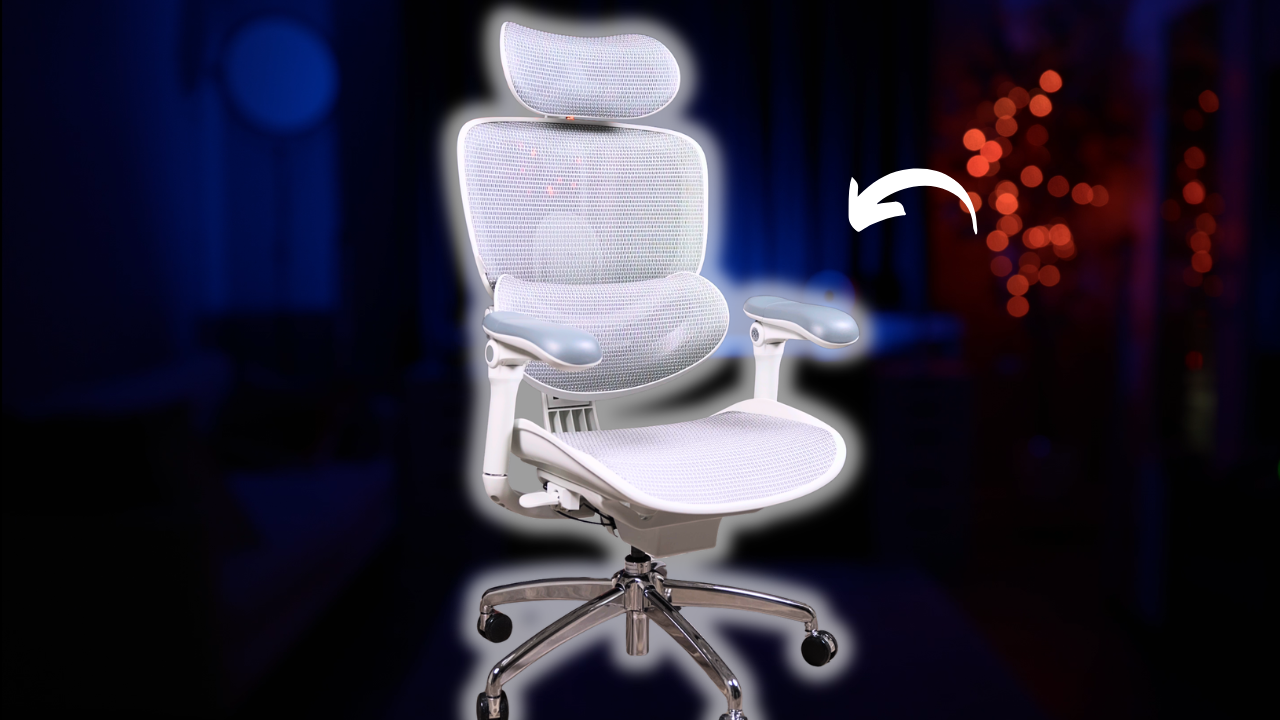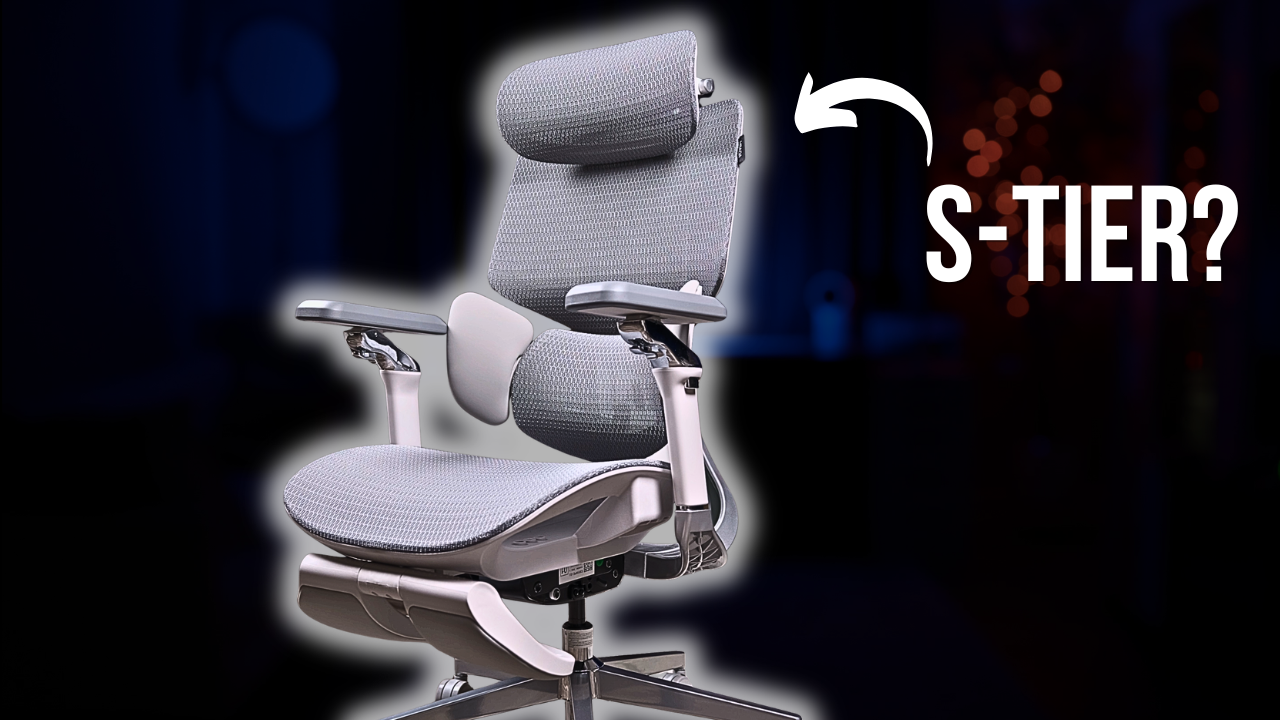
The Hbada E3 Pro is one of the most unique all-mesh office chairs I have tested. Coming in at around $500, it packs in an unusually deep set of adjustments, including independently adjustable upper and lower backrest sections, a dynamic three-part lumbar system with folding side flaps, 720-degree rotational armrests, and a highly adjustable 4D headrest.
If you spend most of your day at a desk, whether you are programming, editing videos, or working from home, you have probably dealt with lower-back discomfort or stiffness around your neck and shoulders. A big part of staying comfortable during long sitting sessions is having a chair you can actually adjust to fit your body, and that is exactly what the E3 Pro is trying to address. But more adjustments do not automatically make a chair better. After spending real time with the E3 Pro, some features genuinely impressed me while others could use some work. Below I will walk through everything you should know before deciding whether it is the right fit for you.

Hbada E3 Pro
- One of the most comfortable mesh seats I’ve tested, with excellent tensioning and a waterfall front edge
- Independently adjustable upper backrest and lumbar support make it easier to dial in the fit
- Extremely adjustable armrests and headrest give you a huge range of positioning options
Excellent Mesh Seat
The Cloud Mesh is slightly firm but has excellent elasticity and springiness. Hbada gets the tensioning right, giving you support without sagging or feeling overly stiff.
Independent Backrest Adjustment
The upper backrest and lumbar section adjust independently, letting you position lower-back support separately from shoulder and upper-back support.
Dynamic Lumbar Support
The three-part lumbar system moves with your lower back and can also be locked into position. Folding side wings create a more wrapped, hugged-in feel if you prefer it.
Massive Adjustment Range
The 720-degree armrests combine dual rotation points with height, depth, and tilt adjustment, while the 4D headrest offers extensive positioning.
Who Should Buy the Hbada E3 Pro?
The E3 Pro makes the most sense for someone who wants an all-mesh chair with a huge range of ergonomic adjustments and is willing to trade some refinement for flexibility.
- People who want a breathable full-mesh chair
- Users who want to independently position their lumbar and upper-back support
- Anyone who values highly adjustable armrests
- People who primarily prefer sitting upright
- Users who want seat-depth adjustment for a better fit
- Buyers looking for a feature-packed chair around $500
✓ Pros
- Excellent mesh seat comfort
- Well-tensioned, springy Cloud Mesh
- Waterfall seat edge reduces thigh pressure
- Seat-depth adjustment
- Independently adjustable upper backrest and lumbar
- Dynamic lumbar maintains contact as you move
- Extremely adjustable 720° armrests
- Comfortable arm pads
- Highly adjustable headrest
- Deep 140° recline
✕ Cons
- Recline tension feels too loose
- Difficult to hold a partial recline without locking it
- Lumbar can ride too high when deeply reclined
- Armrests don’t go low enough for some users
- Armrest rotation points don’t lock
- Easy to knock armrests out of position
- Headrest feels clunky to adjust
- Noticeable headrest wobble
- Hard seat frame isn’t ideal for cross-legged sitting
| Product | Hbada E3 Pro |
|---|---|
| Chair Type | All-mesh ergonomic office chair |
| Mesh | Hbada Cloud Mesh |
| Seat | Mesh with waterfall front edge |
| Seat Depth | Adjustable |
| Backrest | Split backrest with independently adjustable upper section |
| Lumbar | Three-part dynamic lumbar system with folding side flaps |
| Armrests | 720° multi-adjustable armrests |
| Headrest | 4D dual-axis adjustable mesh headrest |
| Maximum Recline | 140° |
| Recline Positions | 105°, 115°, 130°, 140° |
| Recline Mechanism | Weight-activated Auto-Balance mechanism |
| Warranty | 3 years |
| Returns | 30-day money-back guarantee |
| Typical Price | Around $500 |
Bottom Line
The Hbada E3 Pro is one of the more interesting all-mesh office chairs I’ve tested because many of its unusual adjustments are actually useful rather than simply being there for marketing.
The seat is the standout. The mesh tensioning is excellent, the waterfall front edge helps reduce pressure underneath your thighs, and the independently adjustable upper backrest and lumbar section are genuinely useful.
The biggest drawbacks are refinement. The recline feels too loose for my preference, the lumbar can ride too high when reclining, the armrests don’t go low enough and can easily move out of position, and the headrest has noticeable wobble.
If you’re looking for a highly adjustable all-mesh chair around $500 and mainly prioritize upright ergonomic support, the E3 Pro is definitely worth considering.
My Hbada E3 Pro Review in a Nutshell
The Hbada E3 Pro delivers one of the best mesh seats I have used at any price, along with a genuinely useful and highly adjustable backrest. Where it stumbles is in the execution of some of its more ambitious features, particularly the loose recline tension, the lumbar riding up during recline, and armrests that do not lock into position or drop low enough. It is still one of the better all-mesh chairs under $500, especially if the seat and backrest matter most to you.
My Score: 4 / 5
I rate each chair on a scale from 1 to 5 to reflect overall quality. This number combines individual scores from hands-on testing of build quality, seat comfort, back support, recline, armrests, headrest, and value.
Who It’s For
- Long-session desk workers. Programmers, editors, and work-from-home users who want a comfortable mesh seat and a backrest they can dial in to their body.
- Adjustability seekers. Anyone who wants an unusually deep set of adjustments, especially independent upper backrest and lumbar positioning.
- Hot sitters. The all-mesh construction keeps airflow high for people who tend to run warm.
Who It’s Not For
- Cross-legged sitters. Like most mesh chairs, the hard plastic frame around the seat makes tucking your legs up uncomfortable.
- Reclined workers. The loose weight-activated tilt and the lumbar riding up your back make this chair much better upright than reclined.
- Anyone who wants set-and-forget armrests. The rotation points do not lock, so they are easy to knock out of position.
Product Details
- Type: All-mesh ergonomic office chair
- Material: Hbada Cloud Mesh (seat and backrest)
- Colors: Black, grey
- Recline: 140 degrees with 4 locking positions (105, 115, 130, 140)
- Armrests: 720-degree rotational, plus height, depth, and upward tilt
- Headrest: 4D dual-axis
- Warranty: 3 years, plus 30-day money-back guarantee
- Price: Around $500
I Recommend the Hbada E3 Pro For…
- People who prioritize seat comfort. The mesh seat is genuinely one of the best I have tested regardless of price, thanks to excellent tensioning and a smart waterfall front edge.
- Users who want a truly adjustable backrest. Being able to independently position the lumbar and the upper backrest is actually useful here, not just a spec-sheet gimmick.
- Value-focused shoppers. At around $500, you are getting a level of adjustability that is hard to find elsewhere in this price range.
I Don’t Recommend the Hbada E3 Pro For…
- People who recline frequently. The loose tilt tension and the lumbar riding up into your mid-back make the reclined experience noticeably worse than sitting upright.
- Cross-legged sitters. The rigid frame surrounding the mesh will dig into your ankles.
- Anyone sensitive to armrest height. Even at their lowest setting, the arms sit a little too high and can cause shoulder fatigue over long sessions.
In-Depth Test Results
One of the Better All-Mesh Chairs Under $500
Hbada
Hbada E3 Pro
- One of the most comfortable mesh seats I’ve tested, with excellent tensioning and a waterfall front edge
- Independently adjustable upper backrest and lumbar support make it easier to dial in the fit
- Extremely adjustable armrests and headrest give you a huge range of positioning options
Current Deal
Check current pricing and availability.
Design and Build Quality
The E3 Pro is an all-mesh chair built around what Hbada calls their Cloud Mesh, with a modern ergonomic look. A lot of all-mesh chairs tend to look very similar, but the split backrest, large lumbar section, and folding side flaps give the E3 Pro a distinctive appearance. It comes in black or grey, and despite some of the more unusual design elements, it still looks professional enough for pretty much any office setup.
Build quality is solid for the price. You get a steel five-star base, though it is a six-piece design you screw together rather than a single-piece base. The Cloud Mesh runs throughout the seat and backrest, with really good elasticity that feels supportive and durable. It does have more of a plastic-like feel and can be slightly scratchy to the touch, but it is good quality mesh for this price range. The rest of the components feel solid too, with no major creaking or rattling.
Seat Comfort
Seat Comfort – 4.8
The seat is one of the best parts of this chair. Mesh seats are difficult to get right, even on expensive chairs, but this is genuinely one of the most comfortable mesh seats I have used regardless of price. The mesh is slightly on the firm side with really good elasticity and springiness, and Hbada got the tensioning just right. It does not sag or bottom out when you sit down, but it also does not feel overly firm.
The front edge is a standout. A lot of mesh chairs use a foam pad underneath the front of the seat to keep your thighs off the hard plastic frame, but when you sit down your body sinks into the mesh while that foam pad stays elevated, creating a pressure point under your thighs. Hbada moved away from that design in favor of a really nice waterfall edge, giving you a much smoother transition at the front of the seat without that foam pad digging into your legs. You also get seat-depth adjustment to position the seat based on your leg length, and the main controls are easy to reach, with a single side control handling seat depth, seat height, and tilt lock.
Like any mesh chair, this is not ideal if you sit cross-legged or with one leg tucked underneath you, since your ankles can dig into the hard plastic frame around the mesh. But aside from that, Hbada absolutely nailed the seat. I have tested mesh chairs that cost significantly more with worse seats.
Backrest and Lumbar Support
Back Support – 4.4
This is where the E3 Pro gets really interesting. You get independent height adjustment for both the upper backrest and the lumbar support. Normally the entire backrest moves up and down as one piece, but here you can position the lumbar exactly where you want it on your lower back, then separately adjust the upper section for support around your shoulders. That gives you a lot more flexibility to dial in the backrest for your body.
The lumbar system itself is also unique. Instead of a single fixed pad, the E3 Pro uses a three-part system designed to move with your lower back. As you lean forward, shift around, or recline, the lumbar moves with you to maintain contact rather than forcing you into one fixed position. It also glides down to support farther into your sacral area as you move, which spreads the support across your lower back instead of creating one pronounced pressure point. You can adjust the height independently, set how far forward it sits depending on how aggressive you want it, and lock it in place if you prefer a fixed feel.
Then there are the folding side flaps, which Hbada calls their 3-zone elastic lumbar support. You can fold them inward so the lumbar section wraps around your waist for a tighter, more hugged-in feeling. Personally, I prefer leaving them open since I do not like feeling constricted, and even fully open you still get a little of that hugging effect from the padding on the sides. The flaps are foam padded and wrapped in a faux leather material, so they are comfortable either way. Overall this is a genuinely useful backrest, and unlike some chairs where the extra adjustments feel like gimmicks, independently positioning the upper backrest and lumbar actually matters here.
Recline
Recline – 3.3
The E3 Pro has a deep 140-degree recline with four locking positions: 105 degrees for working, 115 and 130 for lounging, gaming, and watching movies, and 140 degrees for resting or napping. The reclining motion itself is smooth.
It uses what Hbada calls their Auto-Balance Mechanism, which is essentially a weight-activated recline that automatically provides resistance based on your body weight, so you do not have to adjust tilt tension manually. Personally, I am not a huge fan of how it feels here. What I look for in a good recline is the ability to lean back and hold myself somewhere in the middle without locking the chair, giving you that floating feeling as you move between upright and reclined positions. On the E3 Pro, the recline is a little too loose. There is some initial resistance, but once you get past a certain point the chair wants to take you most of the way back, and I have a hard time holding a partially reclined position without locking it. I prefer a traditional manual tilt tension adjustment for that reason.
I also noticed an issue with the lumbar when reclining. Sitting upright, the lumbar sits in a good position, but as I recline farther it starts to ride up into my mid-back rather than staying at my lower back. It ends up hitting the wrong spot, and at that point I am not really getting much lower-back support. It makes the reclined position feel awkward, especially considering how good and adaptive the lumbar feels upright. So while the recline is deep and smooth, the ergonomics could be better, and I find the chair much more comfortable upright than reclined.
Headrest
Headrest – 3.5
Hbada calls this their 4D dual-axis neck pillow, and there is a lot of adjustability. You get two separate pivot points, height adjustment, and independent depth adjustment, with a really good range of motion. You can position it far forward or backward, move it up and down, and change the angle depending on whether you want it supporting the back of your head or sitting lower around your neck. It works well in both upright and reclined positions and should accommodate a wide variety of users. The headrest itself is comfortable, using the same mesh as the rest of the chair, and it is wide enough that I do not have to worry about my head hitting the hard plastic frame.
My issues are with execution. There are so many moving parts that adjusting the headrest can feel clunky, especially while seated. I often reach behind my head and make a bunch of little adjustments before getting it right, frequently overshooting and having to reset. The headrest is also pretty wobbly, with noticeable movement when you lightly move it or first rest your head against it. It becomes more stable once you put pressure on it, but the looseness is still there. I am also not a fan of the mounting system, which clamps onto the backrest frame and sits directly over the mesh on the front, raising some concern about that constant pressure wearing down the mesh over time. Overall the headrest is decent and comfortable with tons of adjustability, but it does not feel as refined as I would like.
Armrests
Armrests – 3.8
The armrests are the best example of the E3 Pro doing a lot of things well while also having a couple of significant drawbacks. These are some of the most adjustable armrests I have used. Hbada calls them 720-degree armrests, referring to two separate 360-degree rotation points: the entire arm rotates, and the arm pad independently rotates on top of that. You also get height adjustment, depth adjustment, and an upward tilt. The range of motion is pretty crazy, letting you bring them inward or outward, reposition them for upright or reclined sitting, or rotate them completely out of the way. I especially like the upward tilt for using a phone, tablet, or controller, since you can raise the arms to better support your forearms. The pads themselves are thick, soft, and flat on top with rounded edges, so I can dig my elbows in comfortably without the sides digging into me.
But I have two significant issues. First, the armrests do not go low enough. Even at their lowest setting they sit a little too high for me, pushing my shoulders upward instead of letting them relax, which causes shoulder fatigue over longer sessions. When I am not using them, I basically have to rotate them out of the way to avoid constantly bumping into them. Second, neither rotation point locks into position. The upside is that everything is easy to adjust, but the downside is that it is also easy to accidentally knock the arms out of position, and with this many adjustment points, constantly repositioning them gets annoying. So I have mixed feelings here. In pure adjustability they are some of the best I have used, and the pads are very comfortable, but more adjustability is not necessarily better if you have trouble keeping everything where you want it. For me, the minimum height is the bigger issue since it actually affects my comfort.
Value
Value – 4.3
The Hbada E3 Pro comes in at around $500, and at that price you are getting a lot of chair for the money. The build quality is solid, the mesh feels good, and you are getting an amount of adjustability that is difficult to find on other chairs in this range.
For me, the biggest reason to consider this chair is the seat and backrest. The seat is genuinely one of the better mesh seats I have tested, with excellent tensioning, a well-designed waterfall edge, and seat-depth adjustment for a better fit. I also really like the backrest, since independently positioning the lumbar and upper backrest is actually useful and the dynamic lumbar does a good job maintaining support as you move around. Hbada backs it with a 3-year warranty and a 30-day money-back guarantee, which is decent for a chair at this price.
Final Verdict
One of the Better All-Mesh Chairs Under $500
Hbada
Hbada E3 Pro
- One of the most comfortable mesh seats I’ve tested, with excellent tensioning and a waterfall front edge
- Independently adjustable upper backrest and lumbar support make it easier to dial in the fit
- Extremely adjustable armrests and headrest give you a huge range of positioning options
Current Deal
Check current pricing and availability.
Overall, I really like the E3 Pro. It is one of the better all-mesh office chairs I have tested under $500, and what makes it stand out is not just the sheer number of adjustments. The seat is genuinely comfortable, and some of the more unusual adjustments, particularly in the backrest, are actually useful rather than gimmicky.
It is not perfect. The recline is looser than I would like, the lumbar rides up when you lean back, the headrest feels unrefined, and the armrests do not lock or drop low enough. But if you are looking for an all-mesh chair with a ton of adjustability and a genuinely excellent seat, and you do not mind those drawbacks, the E3 Pro is well worth considering.
Check out the Hbada E3 Pro here for current pricing and more details.
Hbada E3 Pro FAQs
What makes the Hbada E3 Pro different from other mesh chairs?
The E3 Pro offers independent height adjustment for the upper backrest and lumbar, a dynamic three-part lumbar with folding side flaps, 720-degree rotational armrests, and a 4D headrest. That is a deeper set of adjustments than you typically find in this price range.
Is the seat actually comfortable?
Yes. The mesh seat is one of the best I have tested at any price, thanks to excellent tensioning and a waterfall front edge that avoids the pressure point many mesh chairs create with a raised foam pad.
How is the recline?
It reclines a deep 140 degrees with four locking positions and moves smoothly, but the weight-activated tilt feels a little too loose to hold a partial recline without locking, and the lumbar tends to ride up into your mid-back as you lean farther back.
Are the armrests any good?
They are among the most adjustable I have used, with two 360-degree rotation points plus height, depth, and tilt. The trade-offs are that they do not lock into position and do not go low enough, which can cause shoulder fatigue for some users.
What colors and warranty does it come with?
The E3 Pro is available in black or grey and comes with a 3-year warranty plus a 30-day money-back guarantee.
Is the Hbada E3 Pro a good value?
Yes. At around $500, it offers a level of adjustability and a quality of seat that are hard to match, making it one of the better all-mesh options under $500.